
Why inspectors love AutoHotkeys
Home inspectors write many of the same explanations over and over again.
A good inspection report requires careful wording. The language must be clear, professional, and legally precise. But typing those same paragraphs again and again takes time and can lead to small mistakes.
AutoHotkey solves this problem.
Examples from a real inspection report library
The following shortcut is used when additional invasive investigation is needed.
-cyawdo
AutoHotkey automatically inserts:
Further, invasive, investigation is necessary to determine the extent of damage.
A licensed general contractor should inspect further and repair as needed.
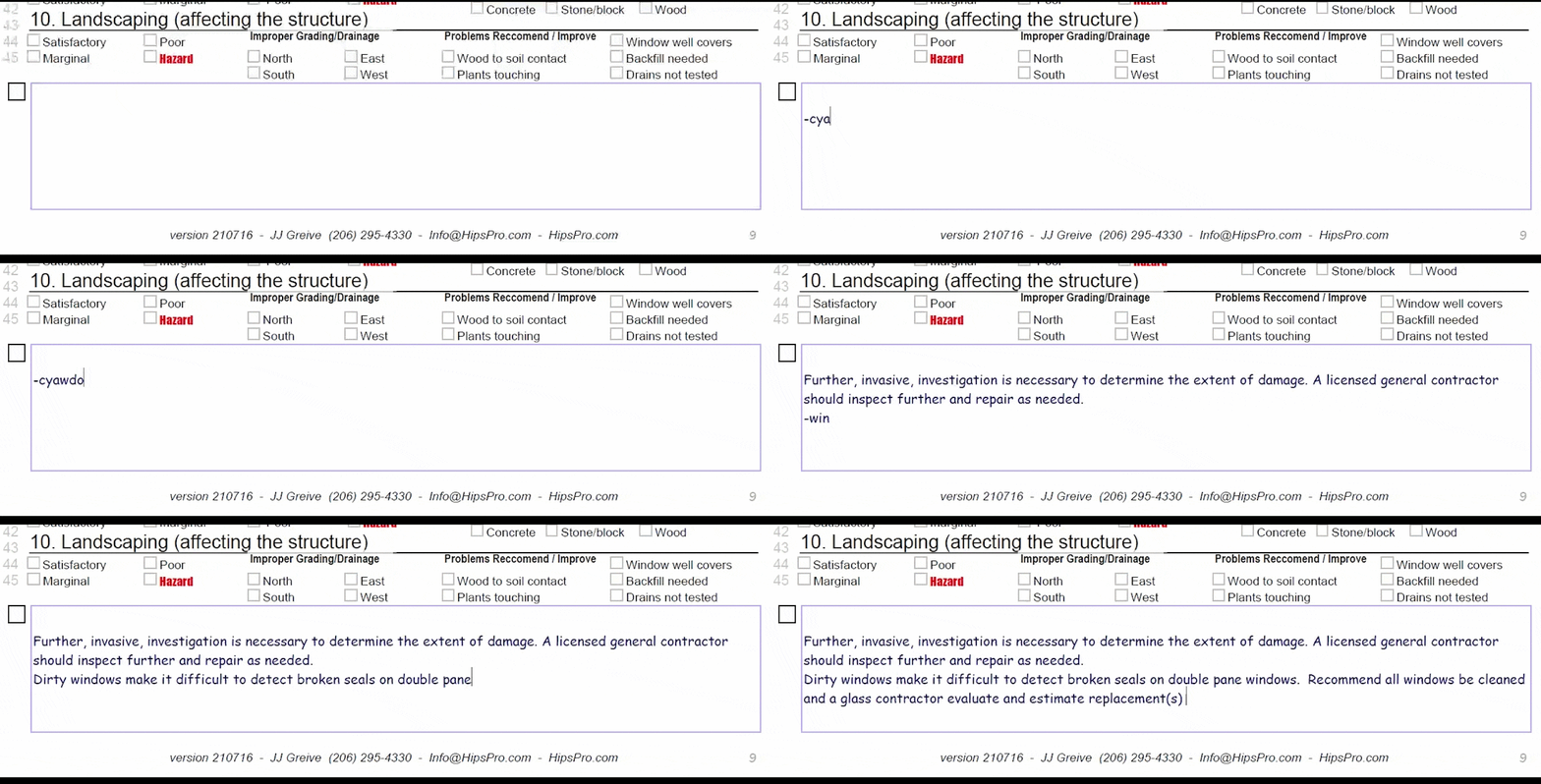
Instead of typing long explanations every time, you can create small shortcuts that automatically expand into carefully written report comments.
This allows you to:
- Write reports faster
- Use consistent, professional language
- Avoid typing mistakes
- Focus on the inspection instead of repetitive typing
Many inspectors build libraries of shortcuts for the comments they use most often.
Download AutoHotkey
Get the official installer here:
Download AutoHotkey: official download page
Official site: AutoHotkey download page
AutoHotkey + ChatGPT = a powerful combination
AutoHotkey itself is simple but learning how to write scripts can feel intimidating at first.
This is where ChatGPT becomes extremely useful.
You can ask ChatGPT to:
- Create AutoHotkey shortcuts
- Fix scripts that are not working
- Explain what a script does
- Help build libraries of inspection comments
- Create new shortcuts for phrases you use frequently
In other words, you don’t need to become a programmer.
You can simply describe what you want the computer to do, and ChatGPT can help generate the script.
Once you start using shortcuts, you’ll quickly wonder how you ever wrote reports without them.
Prompt to use in ChatGPT
Copy the text block below and paste it into ChatGPT for full instructionsTeach me AutoHotkey like I am a complete beginner. I am using Windows and I want to install AutoHotkey v2, create my first script, save it correctly, run it, and test it. Please explain everything step by step in plain English with no skipped steps. I want my first script to do two things: 1. Create a text replacement so when I type @@addr it expands into my full home address. 2. Create a keyboard shortcut that opens this webpage in my browser: https://schoolofprofessionalhomeinspection.com/php/dashboard.php Use AutoHotkey v2 syntax. Show me exactly what code to paste into the script. Explain how to edit the address text with my own address. Explain how to run the script and how to make it start automatically when Windows starts. Also explain how to pause, reload, or exit the script later.
Starter script
#Requires AutoHotkey v2.0

; Type @@addr and press space, enter, tab, or punctuation
; Replace the sample address below with your real address
::@@addr::123 Main Street, Burien, WA 98148

; Press Ctrl + Alt + D to open the SOPHI dashboard
^!d::Run "https://schoolofprofessionalhomeinspection.com/php/dashboard.php"
How to use it
- Install AutoHotkey.
- Create a new file named
MyFirstScript.ahk. - Paste in the code above.
- Save it.
- Double-click the file to run it.


